Deep Dive into Apache Lucene's Core: From In-Memory Buffers to Commits
Apache Lucene is a highly optimized, full-featured search engine library written in Java. While developers frequently interact with its high-level objects like IndexWriter and Document, what happens behind the scenes during ingestion dictates your application’s search latency, indexing throughput, and data durability.
This post reorganizes our extensive notes on Lucene’s internal mechanics—covering concurrency models, file formats, segment lifecycles
Core Components
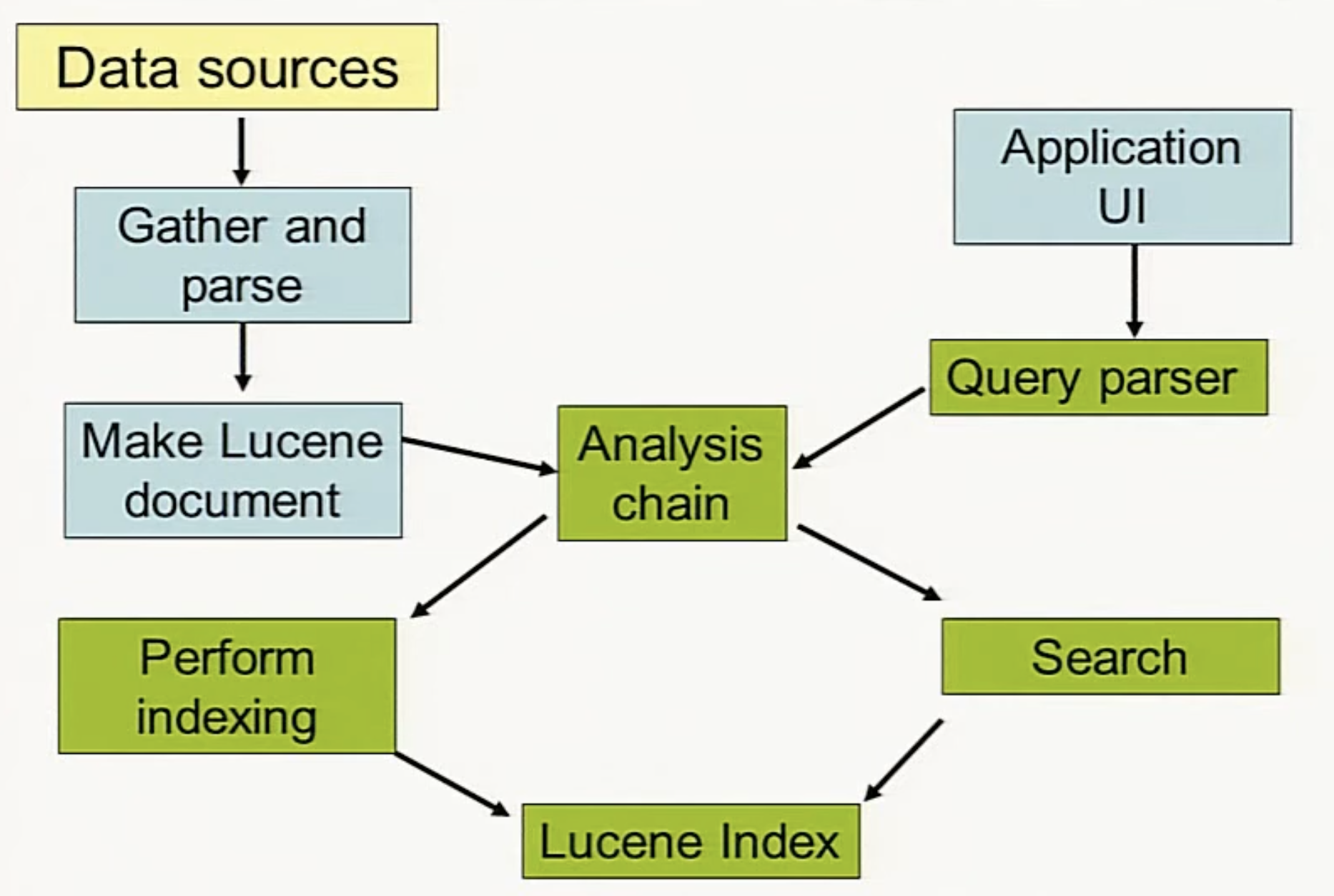
At a high level, parsing an incoming document follows a structured lifecycle. An Analyzer processes and tokenizes the raw text fields. The normalized tokens are then handed off to an IndexWriter, which maintains the state of the overall index by generating optimized inverted indexes.
Here is a foundational example showing how to initialize an index, append documents, and safely query the stored fields:
1
2
3
4
5
6
7
8
9
10
11
12
13
14
15
16
17
18
19
20
21
22
23
24
25
26
27
28
29
30
31
32
Analyzer analyzer = new StandardAnalyzer();
Path indexPath = Files.createTempDirectory("tempIndex");

try (Directory directory = FSDirectory.open(indexPath)) {
  IndexWriterConfig config = new IndexWriterConfig(analyzer);

  // 1. Ingest and write documents
  try (IndexWriter iwriter = new IndexWriter(directory, config)) {
    Document doc = new Document();
    String text = "This is the text to be indexed.";
    doc.add(new Field("fieldname", text, TextField.TYPE_STORED));
    iwriter.addDocument(doc);
  }

  // 2. Open a reader and execute a search
  try (DirectoryReader ireader = DirectoryReader.open(directory)) {
    IndexSearcher isearcher = new IndexSearcher(ireader);
    QueryParser parser = new QueryParser("fieldname", analyzer);
    Query query = parser.parse("text");
    ScoreDoc[] hits = isearcher.search(query, 10).scoreDocs;
    assertEquals(1, hits.length);

    // Iterate through and assert on the stored fields
    StoredFields storedFields = isearcher.storedFields();
    for (int i = 0; i < hits.length; i++) {
      Document hitDoc = storedFields.document(hits[i].doc);
      assertEquals("This is the text to be indexed.", hitDoc.get("fieldname"));
    }
  }
} finally {
  IOUtils.rm(indexPath);
}
In-Memory Buffering and Thread-Local Concurrency
When you invoke IndexWriter.addDocument(), Lucene prioritizes high throughput by avoiding direct disk writes.
Thread Isolation with DWPT
IndexWriter is fully thread-safe. Multiple client threads can invoke writing methods concurrently without competing for a global synchronization lock. Under the hood, Lucene utilizes an internal pool of DocumentsWriterPerThread (DWPT) workers.
- Isolated Memory Pools: Every worker thread is assigned its own private DWPT containing isolated raw primitive array allocations (
ByteBlockPoolandIntBlockPool). - Zero Contention: Tokens are transformed into memory-resident inverted index slices. Because threads append to entirely separate memory blocks, lock contention is completely eliminated during document parsing.
- Independent Segments: Each buffer tracks its own size thresholds.
- If Thread A fills up Buffer A, only Buffer A is flushed, creating a brand-new segment on disk (e.g.,
_0.cfs). - Meanwhile, Thread B can keep writing into Buffer B undisturbed. When Buffer B eventually fills up later, it flushes and creates its own separate segment (e.g.,
_1.cfs). - Because of this architectural design, running 4 concurrent indexing threads will naturally result in a higher number of initial smaller segments on disk, which Lucene’s background
MergePolicywill seamlessly stitch together later.
- If Thread A fills up Buffer A, only Buffer A is flushed, creating a brand-new segment on disk (e.g.,
How Auto-Flushing Works
Lucene monitors these internal memory allocations. The moment your unwritten documents cross the threshold boundaries configured via IndexWriterConfig.setRAMBufferSizeMB() (which defaults to 16 MB) or IndexWriterConfig.setMaxBufferedDocs(), Lucene executes an automatic flush.
1
2
[Thread 1] ---> [DWPT Buffer A] --- (Threshold Hit) ---> Flushes out Segment _0
[Thread 2] ---> [DWPT Buffer B] --- (Threshold Hit) ---> Flushes out Segment _1
Staged, Non-Blocking Flushes
When a specific buffer fills up, Lucene uses a staged, non-blocking flushing strategy. The thread that fills the buffer swaps it out for a fresh, empty memory block. The actual disk I/O—serializing primitive memory slices into structural files—is deferred to background threads.
Consequently, addDocument() returns a transient tracking long sequence number and unblocks immediately. The only exception occurs during a Ticket Backlog: if indexing vastly outpaces disk write speed, active indexing threads are temporarily throttled to prevent JVM Out-of-Memory exceptions.
Demystifying Segments and the Storage Layout
A Segment is an immutable, standalone, and completely functional sub-index. A physical Lucene index is not a solitary file; it is a directory containing multiple data segments unified by a single master metadata file.
Anatomical Layout of an Index Directory
When a flush happens, memory pools materialize on disk as immutable segments designated by an underscore prefix and a base-36 serial generation ID (e.g., _0, _9, _a). They are written in one of two structural formats:
- Compound Format (Default): To prevent running out of operating system file descriptors, Lucene collapses a segment’s distinct sub-structures into a unified virtual container file pair:
.cfs(data container) and.cfe(index map entries). - Uncompounded Format: For very large segments, developers often disable compound files to gain raw disk performance. This exposes the underlying specialized files directly:
| File Extension | Sub-Structure Name | Internal Architecture & Mechanics |
|---|---|---|
.tim / .tip |
Term Dictionary & Index | Stores all unique terms using a Finite State Transducer (FST) for swift memory-mapped prefix lookups. |
.doc |
Postings & Frequencies | Stores compressed integer lists linking unique terms to their containing Document IDs. |
.fdt / .fdm |
Stored Fields Data & Meta | Stores raw data fields that need to be returned upon query hits, compressed using blocked algorithms like LZ4. |
.dvd / .dvm |
Doc Values Data & Meta | A columnar data array optimized for fast sorting, numeric range aggregations, and faceting. |
.liv |
Live Document Bitset | A bit array denoting deletions. Since segments are immutable, deleting a document flips its live bit to 0 instead of altering original files. |
What Does a 3-Segment Index Directory Actually Look Like?
Scenario A: Compound File Format (Default)
In this mode, Lucene collapses all data structures for a single segment into a single virtual container file (.cfs) to prevent the operating system from running out of open file descriptors.
1
2
3
4
5
6
7
8
9
10
11
12
my_index_directory/
├── write.lock          <-- Prevents other processes from writing to this index
├── segments_3          <-- Global metadata pointing to active segments _0, _1, and _2
│
├── _0.cfs              <-- Segment 0: Massive data container (postings, terms, doc values)
├── _0.cfe              <-- Segment 0: Table of contents/index map for the .cfs file
│
├── _1.cfs              <-- Segment 1: Massive data container
├── _1.cfe              <-- Segment 1: Table of contents/index map
│
├── _2.cfs              <-- Segment 2: Massive data container
└── _2.cfe              <-- Segment 2: Table of contents/index map
Scenario B: Uncompounded Format
If you configure Lucene to disable compound files (often done for massive segments to improve raw disk performance), the walls of the .cfs container are broken down. Each of the 3 segments will explode into its individual constituent files. The directory will look much more crowded:
1
2
3
4
5
6
7
8
9
10
11
12
13
14
15
16
17
18
19
20
21
22
23
24
25
26
27
28
29
30
my_index_directory/
├── write.lock
├── segments_3
│
│   // --- SEGMENT 0 ---
├── _0.doc              <-- Postings and frequencies
├── _0.tim              <-- Term dictionary
├── _0.tip              <-- Term index (points into .tim)
├── _0.fdt              <-- Stored fields data
├── _0.fdm              <-- Stored fields metadata
├── _0.dvd              <-- Doc values data
├── _0.dvm              <-- Doc values metadata
│
│   // --- SEGMENT 1 ---
├── _1.doc
├── _1.tim
├── _1.tip
├── _1.fdt
├── _1.fdm
├── _1.dvd
├── _1.dvm
│
│   // --- SEGMENT 2 ---
├── _2.doc
├── _2.tim
├── _2.tip
├── _2.fdt
├── _2.fdm
├── _2.dvd
└── _2.dvm
The Separation of Flush and Commit
A critical point of confusion for search engineers is conflating a Flush with a Commit. They are fundamentally different, one-way operations.
1
2
3
4
5
6
7
8
9
10
11
12
13
14
15
+-------------------------------------------------------------+
|  [addDocument] -> Invokes Memory Ingestion (RAM Pools)       |
+-------------------------------------------------------------+
|
v
+-------------------------------------------------------------+
|  [Flush]       -> Transforms RAM Pools to Disk Page Cache   |
|                   (Creates immutable segments like _0.cfs)   |
+-------------------------------------------------------------+
|
v
+-------------------------------------------------------------+
|  [Commit]      -> Issues hard fsync() and updates root file |
|                   (Writes a brand-new segments_N file)       |
+-------------------------------------------------------------+
- Flush: Moves data from volatile JVM RAM into the operating system’s disk page cache as a new segment file. The directory’s core entry file is not updated. As a result, flushed data remains invisible to active
IndexReaderqueries and is unsafe if the machine loses power. - Commit: Triggers a two-phase operation. First, it forces a flush of any remaining data hidden in DWPT buffers. Second, it calls a physical hardware
fsyncacross all uncommitted segment files and writes a brand-new global metadata root file namedsegments_N(whereNrepresents an incrementing generation counter, such assegments_3).
Why Lucene Doesn’t Auto-Commit
Lucene doesn’t support auto commit. Why? The answer boils down to one critical factor: performance. A Lucene commit is an incredibly heavy and expensive operation. It requires trimming and finalizing all active memory buffers into segments, writing a brand new segments_N file, and—most importantly—issuing an OS-level fsync. This fsync blocks processing until the physical disk hardware confirms the bytes are safely written. Because this creates a hard I/O bottleneck, Lucene intentionally avoids guessing when your application can afford the performance hit, leaving you in full control of the throughput-versus-durability trade-off.
The Two Exceptions: When Commits Feel Automatic
While core Lucene will never auto-commit during active indexing, there are two notable exceptions where the process happens for you:
First, if your application shuts down gracefully and you call IndexWriter.close(), Lucene runs an internal, mandatory commit right before destroying the writer object. This acts as a safety net to ensure your final batch of data isn’t dropped on exit.
Second, if you are using Lucene inside an enterprise orchestration framework like Elasticsearch or Apache Solr, the framework manages the lifecycle for you. These search engines wrap core Lucene inside their own background service threads. They expose configuration settings (like commit_interval or flush_time) that actively track time and volume, running background schedulers that periodically call IndexWriter.commit() on your behalf.
The Two-Phase Commit Contract
To maintain strict ACID transactional safety across the directory, IndexWriter implements the TwoPhaseCommit interface:
- Phase 1: Prepare (
prepareCommit()): All pending buffers are flushed, and the architecture calculates precisely how the upcoming metadata adjustments will look. Heavy I/O finishes here, but the index’s “head” remains untouched. - Phase 2: Commit (
commit()): The tinysegments_Nfile is written out and forced to storage media viafsync. If Phase 1 stumbles or crashes, the application safely triggers arollback(), purging uncommitted segments cleanly without corrupting the historical head state.
Point-in-Time Protection & Deletion Policies
When segments_6 successfully updates, what happens to the older segments_5 file? Lucene relies on an IndexFileDeleter running an IndexDeletionPolicy (by default, KeepOnlyLastCommitDeletionPolicy).
Because active search readers might still be traversing the files declared by segments_5, Lucene leaves the old generation file undisturbed. Once those active search handles close, the background janitor thread sweeps the index folder, safely deleting segments_5 along with any obsolete, historical segment files that are no longer referenced by segments_6.
Background Merging Mechanics
Because segments are immutable, a heavily loaded index continues dropping small segment fragments with every auto-flush. To counter this file proliferation, Lucene depends on background segment merging.
Why Merging is Vital
- Accelerated Search Latency: An
IndexReadermust query every active segment individually and merge the streams. Reducing 1,000 tiny segments down to a handful of consolidated blocks significantly decreases search response times. - Reclaiming Disk Space: Since deletions merely toggle bit arrays inside
.livfiles, old data remains on disk. A merge copies exclusively live rows into a shiny, new segment, allowing the system to fully drop the original fragments and reclaim storage capacity.
When and How Merging Triggers
Whenever a flush completes, an internal MergePolicy (such as TieredMergePolicy) reviews the structural layout of the directory. If it detects an aggregation of similarly sized segments, it schedules an asynchronous optimization task.
This work is offloaded to a MergeScheduler (by default, ConcurrentMergeScheduler). This scheduler processes the segment data alignment on dedicated background threads, ensuring that the heavy reading and writing operations do not block ongoing concurrent addDocument() workloads.
How to Support Ingesting and Indexing 1M Docs into Lucene
Indexing 1 million documents is a modest task for Lucene if you configure your environment to leverage batching and minimize disk I/O bottlenecks.
Performance Checklist
Increase the RAM Buffer Size: The default 16 MB buffer will cause Lucene to flush thousands of tiny segments, forcing heavy background merging. Increase your buffer configuration to let Lucene store more data in RAM before creating a segment:
1
2
// Allocate 256MB or 512MB of RAM buffer depending on your JVM size
indexWriterConfig.setRAMBufferSizeMB(256.0);
Optimize your Commits: Do not call commit() after every single document insert. That will force an fsync bottleneck. Instead, execute your commits in batches (e.g., commit once every 50,000 documents, or time-box it to run once every 30 seconds).
Use Concurrent Threads: IndexWriter is fully thread-safe. Use multiple worker threads to call addDocument() concurrently. Lucene will seamlessly map these to distinct internal DocumentsWriterPerThread allocations without thread-lock contention.
Turn off Compound Format for Bulk Ingest (Optional): If you need absolute maximum ingest speed and your OS has loose open-file-descriptor limits, disable the compound file system wrapper to reduce container packaging overhead during ingestion.
Appendix: References and Code Artifacts
- The master class controlling memory tracking, threading locks, and commit boundaries is found directly within the open-source Apache Lucene IndexWriter Source Code on GitHub.
- Details outlining RAM buffers, document count flushing caps, and background concurrency properties are documented extensively via the official Apache Lucene IndexWriter API Specifications.
- Detailed definitions of segment files, uncompounded sub-components (
.tim,.doc,.dvd), and compound structure configurations are defined in the Apache Lucene Core Codecs Documentation. - Global generation tracking,
commitUserDatakey-value capabilities, and the structural design of thesegments_Nfile are covered in the Apache Lucene SegmentInfos Javadocs.